SharpShooter Gold

Pneuma, the AI built in

Directional drilling software that thinks with you.

One connected system from survey to steering to office - with Pneuma, the AI built in. She watches the rig feed, reads the plan and the BHA sheet, makes the slide call on the sheet and says it out loud. You make the decision.

  • Slide calls, spoken
  • Live anti-collision
  • 3D simulator
  • Learns every motor
  • Rig to office, live

Pneuma · the AI built in

A second set of eyes on every stand.

Pneuma lives inside SharpShooter Gold. She works from the job's own numbers - the surveys, the plan, the BHA sheet and the live rig feed - and she talks, in two voices: Kinsley and Kane.

Makes the slide call

On the slide sheet, with its reason - and says it out loud.

Watches the rig feed

Drilling, sliding, connections and trips, worked out from WITS as they happen.

Exact calculations

Sail angle, slide length, DLS to land, toolface, hydraulics, kill mud - worked with the formulas, never guessed.

Ask by voice

On the rig computer, on the phone, or right here. A spoken question gets a spoken answer.

Pneuma is an AI and can make mistakes - the directional driller decides. What she learns stays with you, or inside your company.

Try her nowfree - no account needed

Everything Pneuma does →

See it work

Watch a well get drilled - then drill one yourself.

The full demo: a made-up well from the EDM import and job set-up to the rig feed live, a motor stall, an anti-collision caution and Pneuma's slide calls in a build-and-turn - narrated by Kinsley. Then the 3D simulator: fly the pad, ride down the well to the bit, and steer it yourself.

What it does

Built for the directional driller. Smart enough to keep up.

Everything the job needs in one program - nothing else to install. Here is what sets it apart.
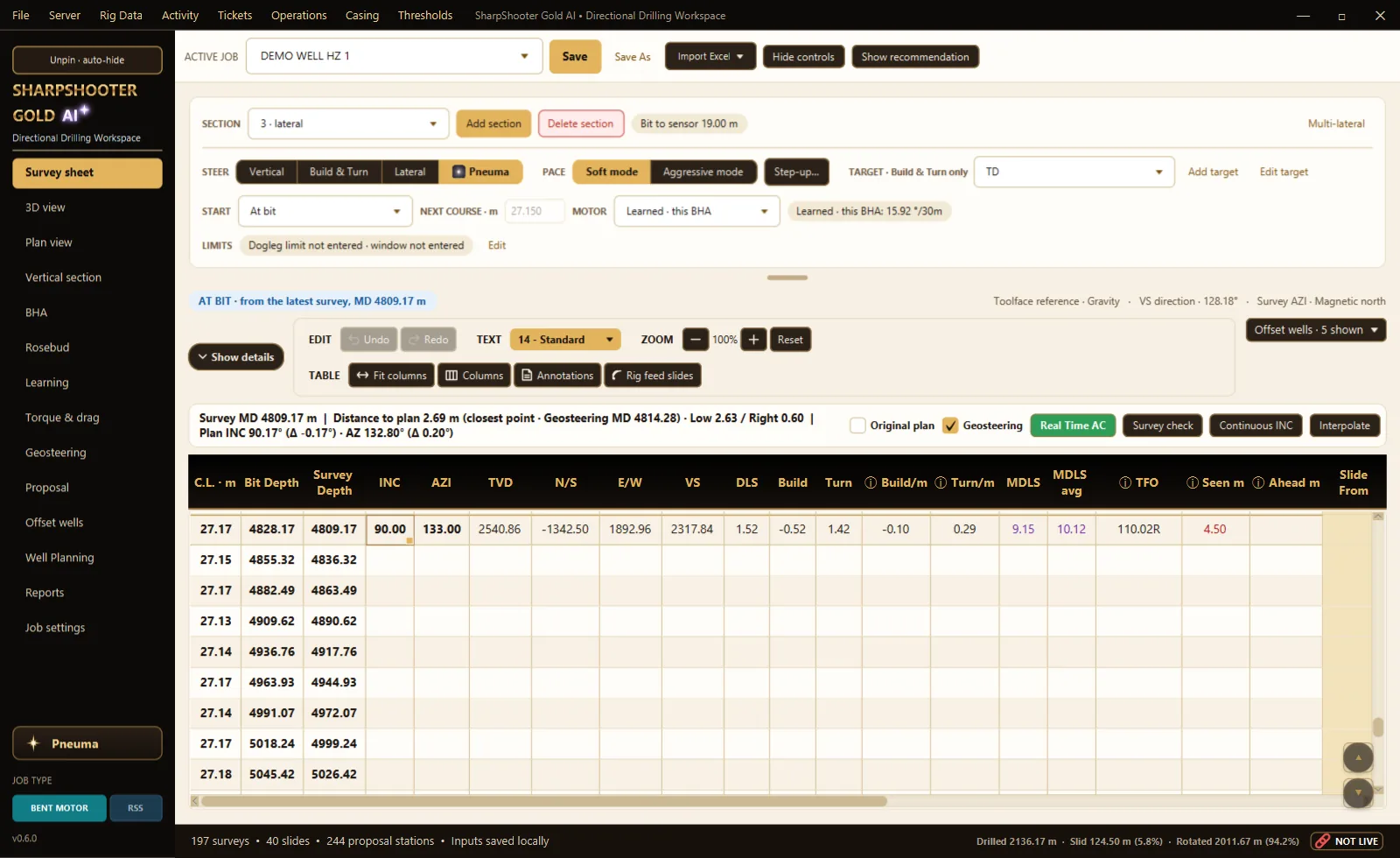
SharpShooter Gold - the survey sheet

The survey sheet

Enter a survey. Everything else follows.

Minimum-curvature surveys, the slide sheet and the steering call on one sheet. Type a survey and every dependent number updates - the at-bit projection, distance to plan and the next slide.

  • The slide call with its reason, made by Pneuma
  • At-bit projection that carries the course's own build and turn
  • Vertical, build & turn and lateral steering modes
  • Survey check against the plan's gravity, field strength and dip
SharpShooter Gold - the 3D view with the offset wells over the pad
Satellite imagery © Mapbox © OpenStreetMap © Maxar · Improve this map

Live anti-collision

Every offset well, in 3D, at every survey.

The closest offsets at the latest survey with centre distance, separation factor, ellipse gap and the warning state - over the satellite picture of your own pad.

  • ISCWSA error models - Rev5 propagation and the MWD+SRGM term set
  • Full covariance or survey-tool models
  • Offsets from COMPASS EDM, plan PDFs, AC reports or Excel
  • The same Live AC in the driller's pocket
The SharpShooter Gold 3D simulator: the pad, the well and the offset wells

The 3D simulator

Drill it before you drill it.

Your well, the plan and every offset in 3D, like a game. Fly around the pad, ride down the well to the bit with the mud motor and the BHA, then set the toolface, slide and rotate - and watch where the bit goes against the plan.

  • Every stand scored for staying on the plan and keeping the hole smooth
  • Pneuma's plan shown beside yours
  • The closest offset and its separation factor on screen as you drill
SharpShooter Gold - torque and drag, with what to look for at the next connection

Engineering, built in

Know the hole is dragging before the next connection.

Torque and drag from the job's own assembly and the drill pipe above it. Type the friction you expect, then let the rig feed tell you what the hole is really costing - and what to look for at the next connection.

  • Pick up, slack off and rotating torque along the string
  • Pressure drop through the string, the bit and the steering tool
  • BHA sections with the full component list and the bit-to-sensor distance
  • The mud report read straight from its PDF
SharpShooter Gold on the computer: the demo well in 3D inside the earth block, with the plan, the projection and the bit
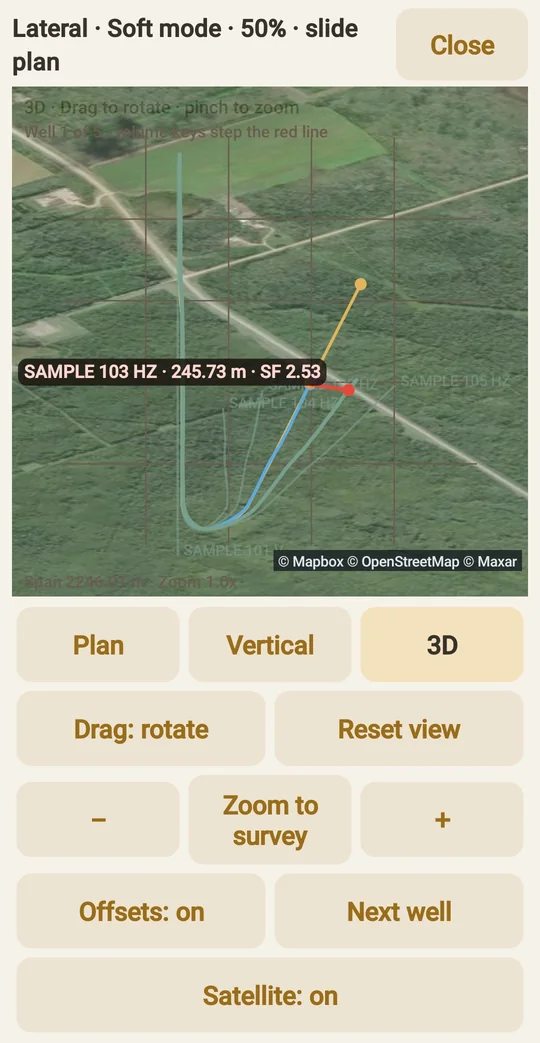
SharpShooter phone app: the well in 3D over the pad with the closest offset wells and the separation factor to the nearest

Satellite imagery © Mapbox © OpenStreetMap © Maxar · Improve this map

Rig to office

The rig, the office and the phone - the same numbers, live.

Field runs on the rig computer. Office and Office Server bring the live job to town and plan the next one. The phone app puts the sheet, the slide call and the offsets in the driller's hand - from anywhere, encrypted end to end.

  • Surveys and slides sent the moment they are typed
  • The rig feed fills the slide sheet - or import the EDR file
  • Runs with no internet; nothing leaves your company unless you send it

Everything in the system

47 features. One workspace, rig to office.

What is in the program today. Judge it against whatever you run now - we would rather show you the list than tell you we are better.

See every featureHide the list

Surveys and position

  • Minimum-curvature surveys, TVD, N/S, E/W, VS, DLS, build and turn
  • Survey check: gravity total, field strength and dip against the well plan's, graded good / watch / bad
  • Magnetic, true and grid north, and the plan's own grid - nothing is re-projected behind your back
  • Toolface crossover angles, observed toolface, interpolated surveys

Steering

  • Slide sheet with toolface and length, and the slide call with its reason
  • At-bit projection that carries the course's own build and turn
  • Vertical, build & turn and lateral steering modes, soft and aggressive pace
  • Targets, the aim line and the drilling window
  • Geosteering with its own plan copy and formation tops

Charts

  • Plan against as-drilled and projection
  • Vertical section and plan view
  • 3D orbit view with the earth block, formation tops and the offset wells
  • Satellite pad picture under the wells, on the computer and the phone

Anti-collision

  • Closest offsets at the latest survey: centre distance, separation factor, ellipse gap, warning state
  • ISCWSA error models - Rev5 propagation, the A001Mc MWD+SRGM term set, IPM files per interval
  • Full covariance or survey-tool models, with the starting uncertainty
  • Offset wells from COMPASS EDM, plan PDFs, AC report PDFs, Excel or another SharpShooter database

Read the full technical note →

Rig data

  • Live WITS feed with a channel mapping you set, or found by name
  • EDR file import - Pason, RigCLOUD, WellData, WITSML or a LAS time log
  • Rig activity worked out from the feed: drilling, sliding, connections, circulating, trips - with the BHA in the hole
  • Your company's own operation codes on the activity, edited in the program
  • Slides told from rotates by five signs added up, not by one channel

The assembly

  • BHA sections with the full component list and the bit-to-sensor distance
  • Pipe tally and depth tally
  • Pressure drop through the string, the bit and the steering tool's faces
  • Torque and drag

Motor learning

  • Every course split into what the motor did and what the well does on its own
  • Filed by the set-up - motor, power section, bend, bit, monels and stabilisers - not by serial number
  • Filed against the inclination it was drilled at
  • Pooled across your rigs through your own Office Server

Rotary steerable

  • RSS mode with its own page and palette
  • Downlink library of published commands, each tagged with where it came from
  • Upload the tool hand's own downlink sheet - Excel, CSV, text or PDF
  • Your sheet is on the page to look up the code; HIA with a one-click log

Office and planning

  • Well planning: vertical, tangent, curve to INC/AZ at a DLS, hold to TVD or a coordinate target
  • Proposal with named plans and plan revisions
  • Plan import from COMPASS EDM, COMPASS plan PDFs, Excel or a pasted trajectory
  • Daily reports, survey and AC reports as PDF, Excel, CSV or TXT, on your own templates

Rig to office

  • Office Server takes the live job from every rig: surveys, slides, activity and the learning
  • Sent when a survey or slide is typed, and hourly on its own
  • SharpShooter Link joins a rig and the office over any internet connection, encrypted end to end
  • Cross-shift handover over the local rig Wi-Fi with no internet at all

On the phone

  • Surveys and slides typed at the doghouse and sent to the computer
  • The slide call, the learned yield and the offsets in your hand
  • Live AC: the closest offset wells at the latest survey
  • Plan view, vertical section and 3D with the satellite pad picture

The job itself

  • One job database on the rig computer - the surveys, slides, BHAs, reports and notes together
  • Automatic backups every 15 minutes, ten kept, restored from inside the program
  • Safety meeting form saved with the well
  • Runs with no internet; nothing leaves your company unless you send it

Learns your motors

Every slide teaches the next one. Every rig teaches the company.

SharpShooter works out what each motor really did and files it against the assembly and the inclination. Your company's Office Server pools it from every rig - so the next rig to pick up that motor starts from your own footage, not from the spec sheet.

YOUR COMPANYnothing leaves itRig 12Rig 7Rig 31what each motor didOFFICE SERVERyour company's own serverevery rig's footage, counted oncemeasurements only - no namesthe company's answerfor its assembliesRig 44 - new wellstarts from thecompany's footageYOUR COMPANYnothing leaves itRig 12Rig 7Rig 31what each motor didOFFICE SERVERyour company's own serverevery rig's footage, counted oncemeasurements only - no namesthe company's answerfor its assembliesRig 44 - new wellstarts from the company's footage

The motor's own work

The surveys split every course into what the motor did and what the well does on its own when you rotate.

Filed by the set-up

Motor size, power section and bend, the bit, and the flex monels, slick monels and stabilisers - no serial numbers, because the same motor comes back from the shop set up differently - plus the inclination.

Shared inside your company

Every rig's footage goes to your own Office Server, counted once, and comes back to any rig running the same assembly. Measurements only, no names - and it never leaves your company.

On the computer

The workspace, page by page.

Pictures of the demo well in SharpShooter Gold Field. Click one to see it full size.

SharpShooter Gold - Survey sheet
Survey sheet Surveys, slides, the steering call and the at-bit forecast on one sheet - shown in the Day look; Night is one click away.
SharpShooter Gold - 3D view
3D view The well, the plan and the offsets over the satellite ground, turned with the mouse.Satellite imagery © Mapbox © OpenStreetMap © Maxar · Improve this map
SharpShooter Gold - Plan view
Plan view Plan against as-drilled on the satellite picture of the lease.Satellite imagery © Mapbox © OpenStreetMap © Maxar · Improve this map
SharpShooter Gold - Vertical section
Vertical section Vertical section with the plan, the projection and the formations.
SharpShooter Gold - BHA
BHA The assembly, its measured output, and what the same set-up did in the same formation before.
SharpShooter Gold - Pressure
Pressure Standpipe pressure by parts: surface, string, motor and tools, bit and annulus, with ECD.
SharpShooter Gold - Torque and drag
Torque and drag Hook load and torque along the string for pick up, slack off and drilling.
SharpShooter Gold - Offset wells
Offset wells The offsets the anti-collision runs against, with their survey tools.
SharpShooter Gold - Reports
Reports Daily reports and the company templates filled from the job.

Recently added

The rig feed fills in the sheet. The office gets the day's stats by itself.

The biggest run of updates since launch: rotary steerable mode, a rig that learns its motors - and now the slide sheet filled straight from the WITS feed, or from the rig's EDR file when there was no feed.

Slides from the rig feed

With WITS on, the slide sheet fills from the rig feed - where each slide started, how many metres, the toolface held - ready to check. No feed? Import the rig's EDR file instead.

Rotary steerable mode

One switch and the whole workspace turns to the tool: a Downlinks page with 54 tool versions across 15 makers, the tool hand's own sheet uploaded, and the log of every downlink sent.

Targets and formation tops come in

Import tops from a well plan PDF or an Excel sheet, and targets from a plan PDF, an Excel sheet or where the plan changes - kick-off, the end of each curve, the landing and TD.

Everything that is new

Editions

Rig, office, and the company server.

Field

The rig computer edition: Keeps the job database, runs the phone connection and provides the calculations that help the directional driller steer the well. Download for Windows - a licence key is needed on each computer.

Office

Town's view of the live job: review data, plan wells and run anti-collision. Well planning lives here.

Office Server

The company's own server: shares jobs with office users, holds the approved IPM library that Field checks against, and pools the motor output every rig learns.

SharpShooter Gold for Android

Directional drilling software, in the driller's hand.

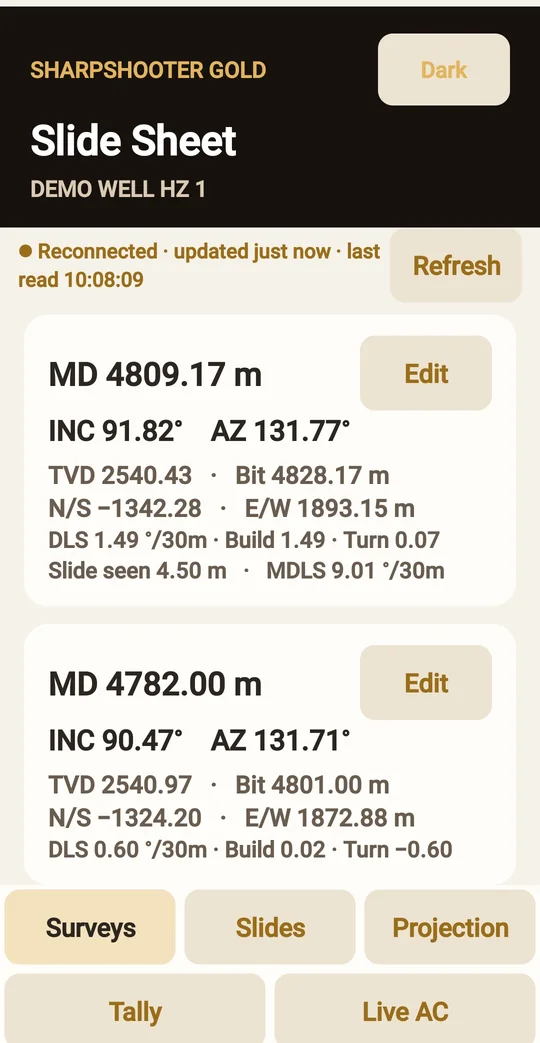
  • Add surveys and slides from the floor - each entry saves straight into the job on the computer.
  • Projections, distance to plan, and the plan, vertical section and 3D charts.
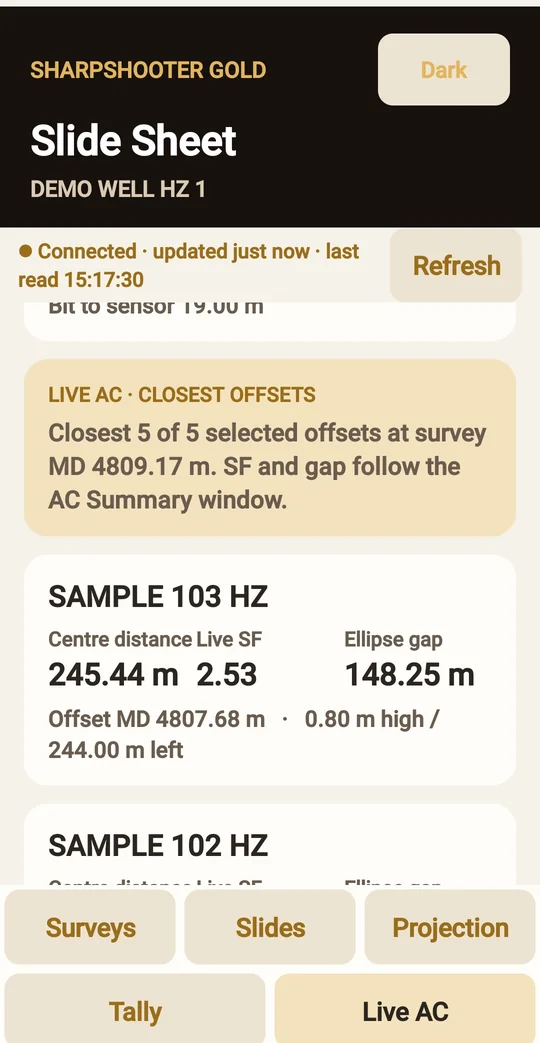
  • Live anti-collision in your pocket: the five closest offsets on the 3D, plan and vertical charts over the satellite picture of the pad, and a red line to the nearest with its distance and separation factor.
  • Future pipe tally and a Live AC tab with every offset's warning state.
  • Sign in by scanning the code on the computer screen. The phone stays signed in.
  • Works on the rig Wi-Fi, or from anywhere through SharpShooter Link.
Surveys
Surveys
Live AC in 3D
Live AC in 3DSatellite imagery © Mapbox © OpenStreetMap © Maxar · Improve this map
Live AC
Live AC

SharpShooter Link

Phones sign in from anywhere. No VPN, no port forwarding.

Both sides dial out to the link relay over port 443, so it passes rig, camp and hotel networks. The relay pairs them by the computer's link code and then only copies bytes. What travels inside is encrypted end to end between the phone and the computer - the relay, and anyone in between, reads nothing.

ENCRYPTED END TO END LTE · camp Wi-Fi · satellite Driller's phone LINK RELAY link.sharpshootergold.com passes bytes through · reads nothing dials out · no port opened Rig or office computer link code SSG-XXXX-XXXX proves its key

Get started

Ready when the rig is.

Download the Field copy, enter your licence key, and open the job. Want to try it first? Request a demo. Companies: the client portal shows every licence you hold and the downloads, and lets the crew activate their own computers. Questions: SSDrillingtech@gmail.com.

Ask Pneuma